
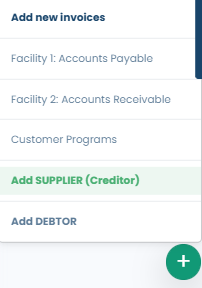
- From the dashboard on the main menu, navigate to the Plus Icon in the bottom right hand on the screen.
- From here, select the Add Supplier prompt to begin.
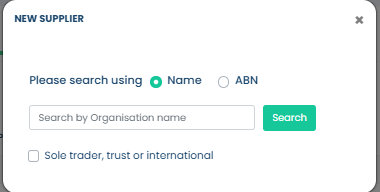
- A pop up will appear to either add a supplier via Name or ABN. Please select one of the two, or alternatively, if your supplier is either a sole trader, trust, or international - please select the checkbox outlining this.
- Please complete the required information and indicate whether you would like to invite the supplier to join the Platform.

- Choosing the Yes option will allow you to add the supplier as a Disclosed Supplier - Selecting the disclosed option allows for Fifo to reach out to your supplier, should this be required.
- Choosing the No option allows you to add a supplier as Undisclosed.- Selecting the undisclosed option will ensure that Fifo keeps your financial arrangements with the supplier confidential.
- Please ensure you provide the following essential information for your suppliers:
- Organisation Name
- First Name
- Last Name
- ABN
- Phone
After you have filled in all the required information, click on the Submit button to proceed.
- After submission, this supplier will be ready for you to upload invoices for processing through Fifopay. Please make sure to email any previous banking remittance to your designated Fifo team member for verification.