
Adding a supplier invoice and extending your terms in Fifopay is easy! Just follow these simple steps below to get started, or watch this short video.
Step 1 - Navigate to the Purchase Invoices menu heading.
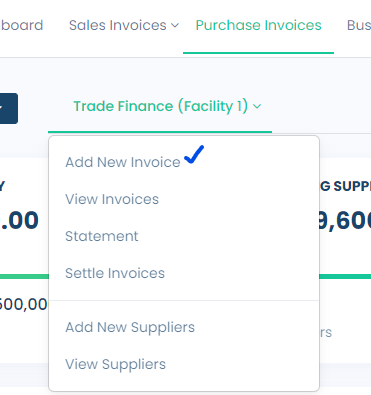
Step 2 - In the Facility drop-down menu, select Add New Invoice.
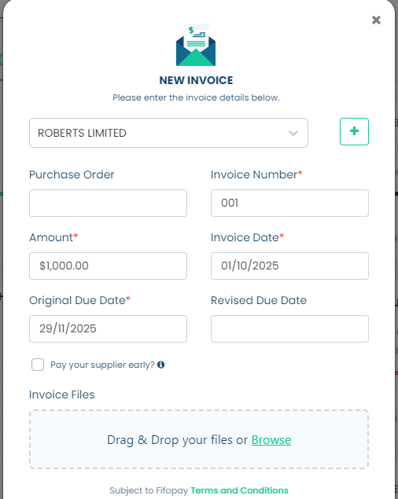
Step 3 - Now, take a moment to enter the details just as they appear on the invoice. Don't forget to select a Revised Due Date, which is the date you plan to pay the invoice and any outstanding fees (to Fifo Capital).
It's also super important to attach the actual invoice—this step cannot be skipped! Remember, the fields marked with "*" are essential, so be sure to fill those in.
Select "Next".
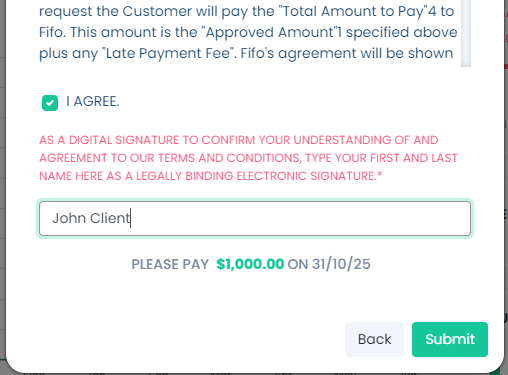
Step 4 - Read the conditions and tick "I AGREE", enter your name and press "Submit"
We're excited to let you know that your invoice has been successfully approved for payment!
The Fifo Capital Operations team has been notified and will make sure that the supplier receives the invoice amount on the Original Due Date, as long as it was submitted before the same day cut-off time. Feel free to check out your invoice in the Approved for Payment section!